
Cross-Agent Observability
Full observability into every coding agent and the code they generate.
Git AI for Teams is an out-of-the-box data pipeline and dashboards providing full observability into every coding agent and the code they generate — across every repository, team, and development stage.
📊 Additional telemetry - Join the AI attributions from the CLI with pull request data, additional agent telemetry, token usage and cost, full prompt and agent session traces, APM incidents, and more — so companies get full visibility into every coding agent and the code they generate.
⚡ Easy setup - Install the SCM app at the organization level and begin tracking every repository immediately. No CI actions or repo-level configuration required.
🏠 Fully self-hostable — Git AI for Teams runs as a managed cloud service or can be fully self-hosted.
Setup
Getting started takes three steps:
- Start a trial here and schedule an onboarding call
- Connect a source control provider (GitHub, GitLab, or Bitbucket)
- Install Git AI on developer machines
Analytics
AI Usage
Git AI measures the overall adoption of AI coding at a company.

| Metric | Description |
|---|---|
| % AI-asisted PRs | Share of total pull requests that include AI-authored code |
| % AI code | Share of the team's total code written by AI agents |
| Merged AI code (week) | Share of the team's total code written by AI agents |
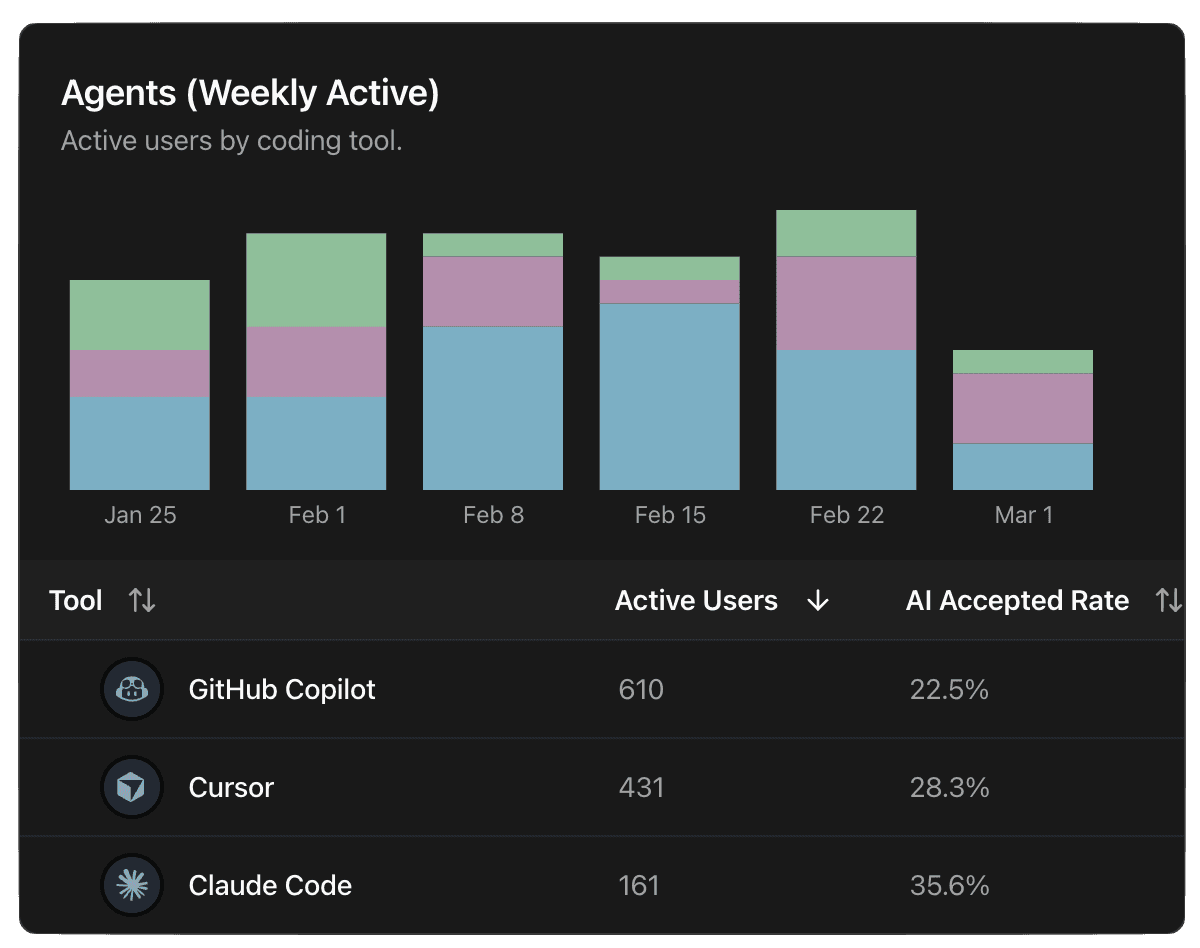
Weekly Active Agent Users
Track which agents developers prefer over time and manage your licenses efficiently.
Track AI Code Through the Entire SDLC
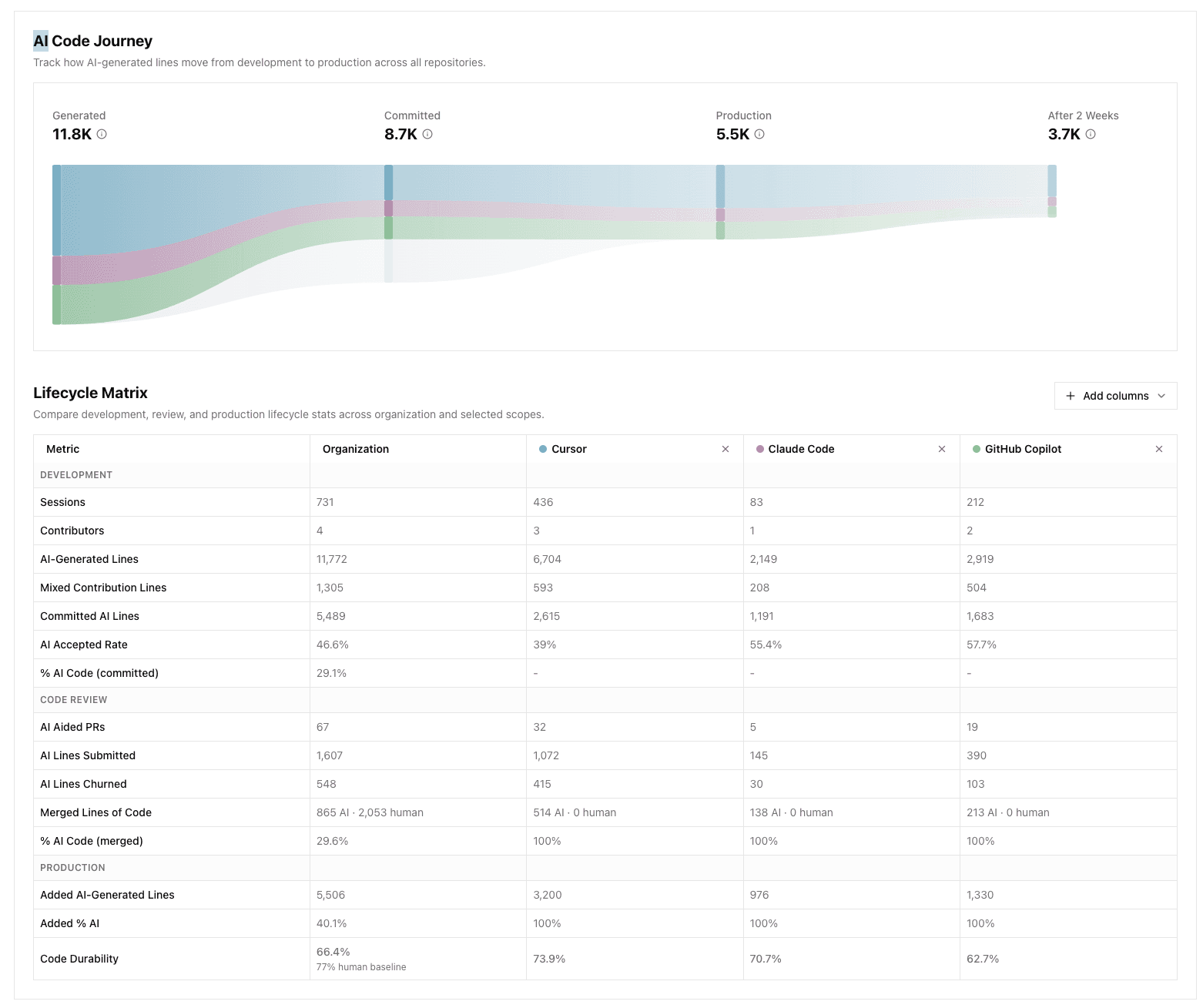
Git AI tracks AI-authored code through every stage of the software development lifecycle, from the moment an agent generates a line to its long-term durability in production.
Every agent session is traced from the first prompt. Measure how much AI-generated code gets committed (accepted rate), how much survives code review, how much reaches production, and how durable and reliable that code is over time. Aggregate by pull request, repository, team, or org-wide.
| Development |
|---|
| Generated — total lines produced by agents, including lines later discarded Committed — lines that make it into a git commit Measure acceptance rate and token usage. |
| Code Review |
|---|
| Opened in PR — AI-authored lines present when a PR is opened Merged — AI-authored lines that survive review and land in the target branch Measure churn rate and reviewer rework during code review. |
| Production |
|---|
| Durability / Rework — whether AI-authored lines remain intact, and how many times they are rewritten in the weeks following merge Bugs / Incidents — incident count correlated with AI-authored code regions Measure long-term durability, rework frequency, and incident correlation. |
Breakdowns
You can breakdown the path of AI-code any dimension to compare tools, models and practices to understand what works best:
| Breakdown | Example questions |
|---|---|
| By coding agent | Which agents have the highest acceptance rates? Is AI code from one agent reworked more than another? |
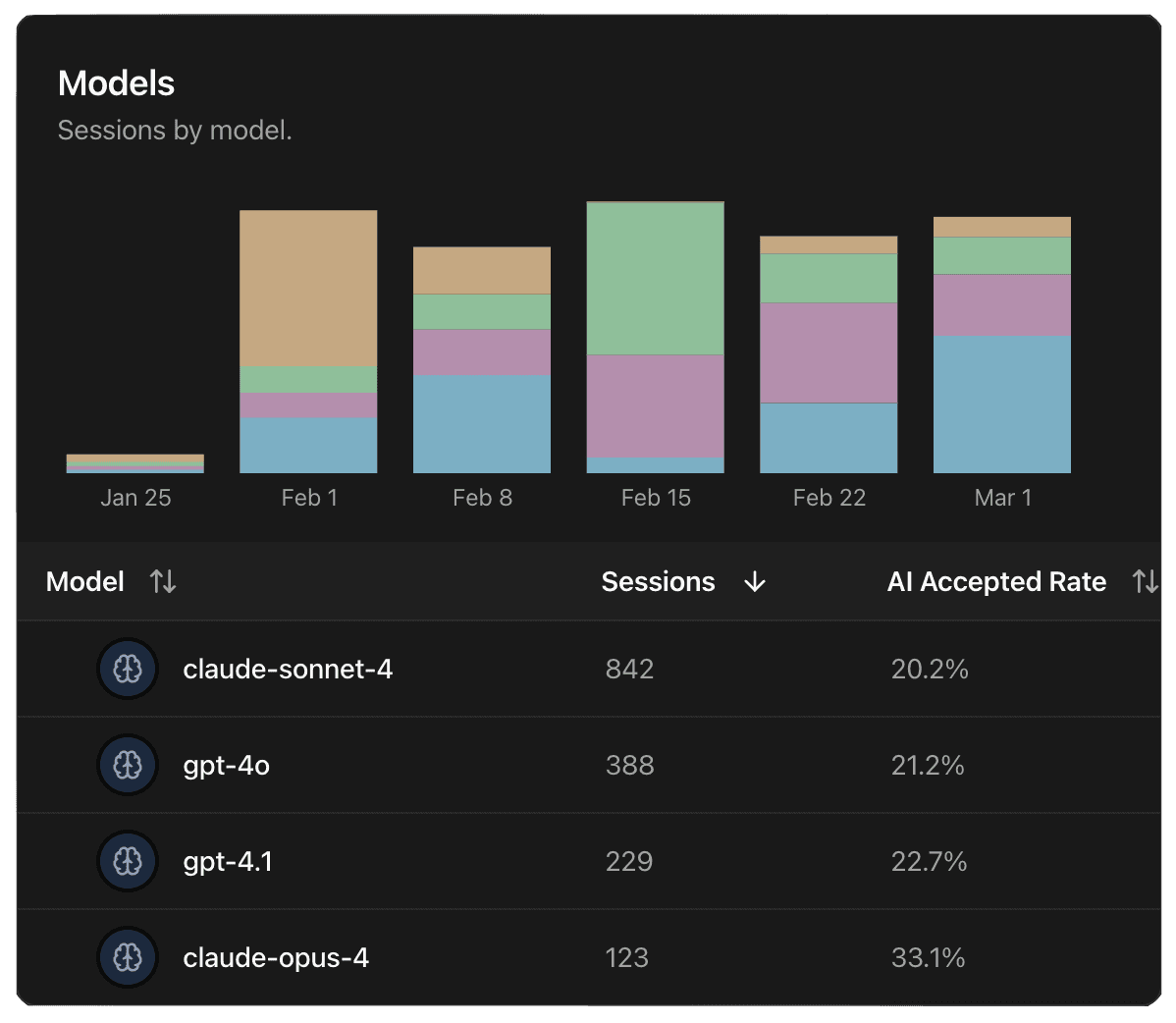
| By model | How many tokens are consumed per accepted line? What is the cost per pull request across models? |
| By pull request | What is the ratio of generated code to merged code in a given PR? How durable is the code after merge? |
| By team | Which teams are getting the most value from agents? Where should the organization invest next? |
| By repository | Which parts of the codebase have the highest AI code acceptance rates? Are some repos more AI-ready than others? |
| By individual contributor | Which contributors are writing the most code with agents? Who has the highest acceptance rates? |
| By background vs local agents | Is background agent code reworked more frequently than local agent code? How do costs compare? |
| By prompting techniques | What prompting practices lead to the highest code acceptance rates? How do MCPs, skills, and rules files affect output quality? |
| By custom attributes | Application-specific breakdowns defined by the team |
Contributor Metrics
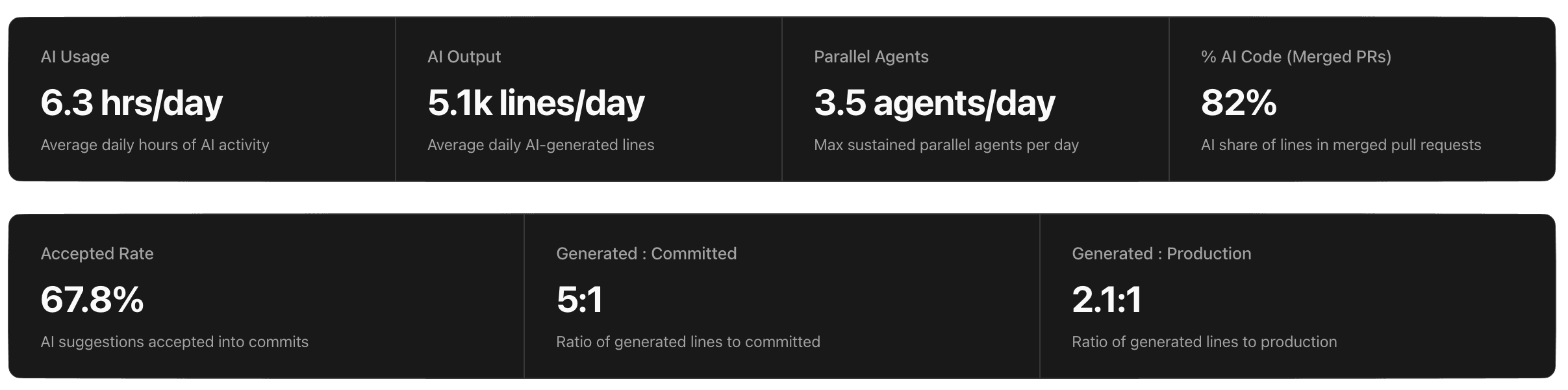
Per-contributor dashboards surface individual AI coding patterns:
| Metric | Description |
|---|---|
| % AI code | Share of each contributor's committed code attributed to AI agents |
| Generated : production ratio | How many AI-generated lines it takes to produce one line that reaches production |
| Parallel agents | Number of concurrent agent sessions, and which agents and models are used |
| Prompting practices | Prompt length, context usage (MCPs, rules files, skills), and correlation with acceptance rates |
FAQs
How is this different from the Agent dashboards and tools like Jellyfish?
Agent dashboards (Cursor, Copilot, Claude) track token usage and lines inserted but don't follow that code through the rest of the SDLC. Dev productivity tools (Jellyfish, LinearB) ingest SCM data but have no visibility into agent sessions. Git AI collects a new class of telemetry that AI-native organizations need: unified data from every agent, full session traces, and lifecycle tracking of AI code from generation through production — including acceptance rates, code review churn, durability, and incident correlation.
How is this different from the open source CLI?
The open source CLI tracks AI code attribution at the commit level using git notes. Going from commit-level stats to tracking AI code through the entire SDLC requires significant additional processing: joining attributions on SCM metadata, computing per-PR metrics while handling force pushes and rebases, integrating with APM tools and sourcemaps, etc. Git AI for Teams also collects additional telemetry that does not belong in git notes — session traces, token usage, cost data, and prompt analysis — enabling tracking costs per PR, analyzing prompt effectiveness, and measuring the impact of MCPs, skills, and rules files.
For teams that want to go deeper or join the data with other sources, Git AI supports exporting to data warehouses.